What Is IoT Device Management? How It Works, Features & Benefits
Published: 26 Aug 2026
The Internet of Things (IoT) connects sensors, machines, appliances, vehicles, and other physical devices to networks so they can collect, send, and receive data. As the number of connected devices grows, organizations need a reliable way to register, configure, monitor, update, secure, and control those devices throughout their operational life. This is where IoT device management becomes important.
IoT device management is the process of managing connected devices remotely and centrally from deployment through maintenance and retirement. It includes tasks such as device provisioning, configuration, health monitoring, remote control, software and firmware updates, troubleshooting, and lifecycle management.
Managing a small number of devices manually may be possible, but large IoT deployments can contain hundreds, thousands, or even millions of connected devices. A centralized device management approach helps organizations maintain visibility, automate routine tasks, identify problems, and keep devices operating reliably.
In this guide, you will learn what IoT device management is, how it works, its key features, architecture, monitoring and control capabilities, lifecycle management process, benefits, challenges, and the role of IoT device management platforms and software.
Quick Answer
IoT device management is the centralized process of deploying, configuring, monitoring, controlling, updating, and maintaining connected IoT devices throughout their lifecycle. It helps organizations manage large numbers of devices without handling each device manually.
A typical IoT device management system can handle device provisioning, configuration, monitoring, remote control, firmware updates, security, troubleshooting, and device retirement. This makes it easier to keep connected devices reliable, secure, and operational as an IoT deployment grows.
Table of Contents
1. What Is IoT Device Management?

IoT device management is the process of deploying, configuring, monitoring, controlling, updating, and maintaining connected devices from a centralized system. It gives organizations a way to manage IoT devices throughout their lifecycle instead of handling each device individually.
An IoT device management system typically keeps track of devices, their connection status, configurations, software versions, and operational health. Administrators can use the system to register new devices, change settings, identify problems, send updates, and manage devices remotely.
As IoT deployments grow, centralized management becomes increasingly important. A business managing hundreds or thousands of connected devices needs visibility into device status and a reliable way to perform routine management tasks at scale.
What Does IoT Device Management Include?
The main functions include:
- Device provisioning: Registering and preparing devices for deployment.
- Device configuration: Setting and changing device parameters remotely.
- Device monitoring: Tracking connectivity, health, performance, and status.
- Remote device control: Sending commands or changing operating settings.
- Software and firmware updates: Keeping devices updated after deployment.
- Security management: Managing device identities, authentication, and access.
- Troubleshooting: Detecting problems and helping administrators resolve them.
- Lifecycle management: Managing devices from initial deployment through decommissioning.
These functions work together to keep connected devices visible, manageable, secure, and operational throughout their lifecycle.
2. How Does IoT Device Management Work?
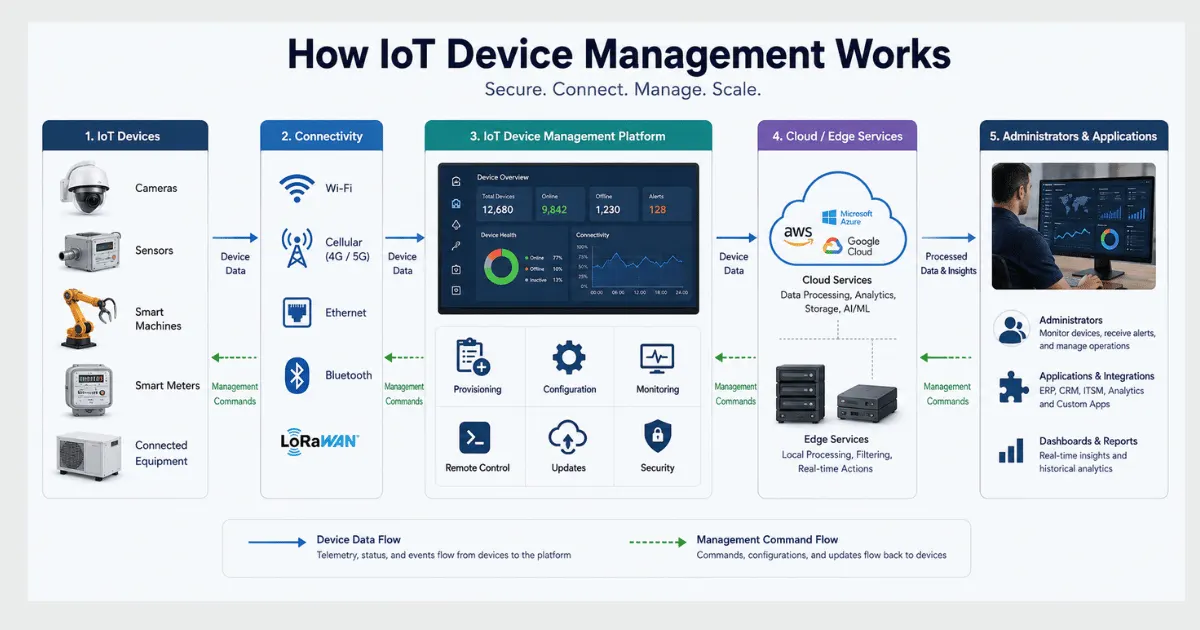
IoT device management works through a centralized system that communicates with connected devices over an IoT network. It allows administrators to identify devices, configure their settings, monitor their condition, send commands, install updates, and manage devices throughout their lifecycle.
The process generally follows these stages:
Register → Provision → Configure → Connect → Monitor → Update → Maintain → Retire
2.1 Device Registration and Provisioning
The first step is adding an IoT device to the management system. The device receives a unique identity and the credentials needed to connect securely to the IoT platform or network.
Provisioning can include:
- Registering the device
- Assigning a device identity
- Setting authentication credentials
- Applying initial configuration
- Connecting the device to the management platform
2.2 Device Configuration
After provisioning, administrators configure the device according to its intended purpose. Settings can often be changed remotely without physically accessing the device.
For example, administrators may change:
- Operating parameters
- Network settings
- Reporting intervals
- Data collection settings
- Device policies
This makes IoT device configuration management especially useful when devices are deployed across different locations.
2.3 Device Monitoring
The management platform continuously or periodically checks device status and health. It can collect information such as connectivity, performance, battery level, errors, and software versions.
Monitoring helps administrators identify devices that are offline, malfunctioning, or operating outside expected conditions.
2.4 Remote Control and Management
IoT device management can also allow authorized users to send commands to devices remotely. Depending on the device and application, this may include restarting a device, changing settings, triggering an action, or diagnosing a problem.
2.5 Software and Firmware Updates
Connected devices may need security patches, bug fixes, or new firmware after deployment. An IoT device management system can distribute updates remotely and track which devices have successfully received them.
This reduces the need for physical maintenance, particularly when devices are deployed across large or difficult-to-access areas.
2.6 Device Maintenance and Retirement
Management continues after deployment through monitoring, troubleshooting, configuration changes, and updates. When a device reaches the end of its useful life, it can be decommissioned and removed from the active device inventory.
This lifecycle approach helps organizations maintain control of devices from initial provisioning to final retirement.
3. Key Features of IoT Device Management
An IoT device management system provides a set of functions that help organizations operate connected devices after deployment. These features cover everything from registering devices and changing their configuration to monitoring performance, applying updates, and managing security.
| Feature | What It Does | Why It Matters |
| Device provisioning | Registers and prepares devices for deployment | Makes it easier to add devices at scale |
| Device configuration | Changes device settings and operating parameters | Reduces manual configuration |
| Device monitoring | Tracks device health, connectivity, and status | Helps detect problems early |
| Remote device control | Sends commands and management actions remotely | Allows devices to be managed without physical access |
| Firmware and software updates | Delivers updates and security patches | Keeps devices reliable and secure |
| Device authentication | Verifies device identities before access | Helps prevent unauthorized connections |
| Diagnostics and troubleshooting | Identifies errors and device problems | Speeds up maintenance and problem resolution |
| Lifecycle management | Manages devices from deployment to retirement | Maintains control throughout the device lifecycle |
3.1 Device Discovery and Provisioning
Device provisioning is the process of adding an IoT device to a management system and preparing it for secure operation. The process can assign a unique identity, credentials, configuration settings, and management policies.
Automated provisioning becomes particularly important when organizations deploy large numbers of similar devices. Instead of configuring each device manually, predefined rules can be applied during deployment.
3.2 Remote Device Configuration
IoT device management allows administrators to change device settings remotely. Configuration may include network parameters, reporting intervals, operating thresholds, or other device-specific settings.
Remote configuration reduces the need for physical access and makes it easier to maintain devices deployed across different locations.
3.3 IoT Device Monitoring
IoT device monitoring tracks the operational condition of connected devices. Depending on the system, administrators may monitor connectivity, device health, battery levels, performance, errors, and software versions.
Monitoring provides visibility into the device fleet and can help identify offline or malfunctioning devices before they cause larger operational problems.
3.4 Remote IoT Device Control
Remote control allows authorized administrators to send commands or management actions to connected devices. These actions can include restarting a device, changing settings, triggering a function, or performing a diagnostic operation.
The exact control capabilities depend on the device, communication protocol, and management platform.
3.5 Firmware and Software Updates
IoT devices often require firmware or software updates after deployment. Updates can fix bugs, improve performance, introduce new capabilities, or address security vulnerabilities.
A centralized management system can distribute updates to selected devices or device groups and track their installation status.
3.6 Device Security and Authentication
Security is another important part of IoT device management. Management systems can help maintain device identities, authentication credentials, access policies, and other security controls.
Restricting management actions to authorized users and authenticated devices helps reduce the risk of unauthorized access.
3.7 Diagnostics and Troubleshooting
Device management platforms can collect status information and error data that help administrators identify problems remotely. Instead of inspecting every device physically, technicians can use available diagnostics to determine whether a device has a connectivity, configuration, software, or hardware-related issue.
3.8 IoT Device Lifecycle Management
IoT device management continues throughout the device lifecycle. A device may be registered and provisioned, configured for operation, monitored during use, updated when necessary, maintained when problems occur, and eventually decommissioned.
This lifecycle approach helps organizations maintain an accurate inventory and prevent inactive or retired devices from remaining part of the active IoT environment.
4. IoT Device Management Architecture
IoT device management architecture describes how connected devices are registered, connected, monitored, configured, and controlled through a management system. It provides the operational layer between the physical devices and the applications or people responsible for managing them.
A simplified IoT device management architecture looks like this:
IoT Devices → Connectivity → Device Management Platform → Cloud/Edge Services → Applications & Administrators
4.1 IoT Devices
The architecture begins with connected devices such as sensors, actuators, machines, meters, vehicles, and smart appliances. Each device generates data and may receive commands or configuration changes from the management system.
For example, a temperature sensor may send readings to the platform while receiving configuration instructions such as how frequently it should report data.
4.2 Connectivity Layer
Devices need a communication method to exchange data with the management platform. Depending on the deployment, connectivity can use technologies such as Wi-Fi, cellular networks, Ethernet, Bluetooth, LoRaWAN, or other IoT communication technologies.
The connectivity layer is responsible for carrying device data and management commands between endpoints and the systems that manage them.
Internal link opportunity: Link IoT connectivity to your existing IoT Connectivity article, and link relevant protocol terms to your IoT Communication Protocols cluster.
4.3 IoT Device Management Platform
The device management platform is the central management layer. It maintains device identities and inventories and provides functions such as:
- Device provisioning
- Configuration management
- Device monitoring
- Remote control
- Firmware updates
- Authentication
- Diagnostics
- Lifecycle management
Administrators can use the platform to manage individual devices or groups of devices without directly accessing each physical device.
4.4 Cloud and Edge Services
Depending on the IoT architecture, management functions may be handled through cloud services, edge infrastructure, or a combination of both.
Cloud-based management can provide centralized administration and scalability across large device fleets. Edge-based management can support local processing and management when devices need low-latency responses or intermittent connectivity to the cloud.
Your existing Edge Computing in IoT and Cloud Computing in IoT articles can be linked here rather than repeating those concepts in detail.
4.5 Applications and Administrators
The final layer provides the interface through which users interact with the managed device fleet. Dashboards, APIs, alerts, and management tools can show device status and allow authorized users to perform administrative actions.
This architecture allows device management to operate as a continuous process rather than a one-time deployment activity.
5. IoT Device Monitoring and Control
IoT device monitoring is the continuous process of checking the status, health, connectivity, and performance of connected devices. It gives administrators visibility into the condition of an IoT device fleet and helps them identify problems before they affect operations.
Monitoring and control work together. Monitoring shows what is happening with a device, while remote control allows authorized users to take action when a change or problem is detected.
5.1 What Does IoT Device Monitoring Track?
The exact metrics depend on the type of device and application, but an IoT device management system may track:
| Monitoring Area | What May Be Tracked |
| Device status | Online, offline, active, inactive |
| Connectivity | Signal strength, connection status, network errors |
| Performance | Processing activity, response time, operating conditions |
| Power | Battery level, charging status, power consumption |
| Software | Firmware version, software version, update status |
| Errors | Faults, warnings, failed operations |
| Data | Sensor readings, reporting frequency, transmission status |
This information helps administrators understand whether devices are operating as expected.
5.2 How Does Remote IoT Device Control Work?
Remote IoT device control allows an authorized user or application to send commands to a connected device without physically accessing it.
Depending on the device, remote actions may include:
- Restarting a device
- Changing configuration settings
- Adjusting operating parameters
- Triggering a specific function
- Starting a diagnostic process
- Applying an update
The device must support the required commands, and the management system must have appropriate authentication and access controls.
5.3 Why Are Monitoring and Control Important?
Monitoring becomes particularly valuable when IoT devices are deployed across different locations. A technician may not be able to physically inspect every sensor, machine, vehicle, or connected appliance.
With centralized monitoring, administrators can identify devices that are offline, experiencing errors, running outdated software, or showing unusual behavior. Remote control can then allow them to respond without immediately sending someone to the device location.
This combination of visibility, monitoring, and remote action is one of the main reasons organizations use IoT device management at scale.
6. IoT Device Configuration and Updates
IoT devices often need configuration changes and software updates after they are deployed. IoT configuration management allows administrators to change device settings remotely, while update management helps keep firmware and software current.
6.1 IoT Device Configuration
Device configuration involves setting the parameters that determine how an IoT device operates. Depending on the device, these settings may control network connections, data collection, reporting intervals, operating thresholds, or other functions.
Centralized configuration allows administrators to apply changes to individual devices or groups of devices without physically accessing them.
6.2 IoT Device Configuration Management
IoT device configuration management helps organizations maintain consistent settings across a device fleet. Administrators can define configurations, apply them to devices, and monitor whether the intended settings are active.
This is particularly useful when many devices perform similar functions but are deployed in different locations.
6.3 IoT Update Management
IoT update management covers the process of delivering firmware and software updates to connected devices. Updates may be required to:
- Fix software bugs
- Improve device performance
- Add new capabilities
- Address security vulnerabilities
- Maintain compatibility with other systems
A device management platform can identify which devices require an update and track the status of the update process.
6.4 Remote Firmware Updates
Remote firmware updates allow organizations to maintain devices without physically visiting each location. This can be especially valuable for devices installed in remote, large-scale, or difficult-to-access environments.
However, updates need to be managed carefully. Organizations should verify device compatibility, maintain secure update mechanisms, monitor installation status, and have a recovery process for failed updates.
Together, configuration management and update management help organizations keep IoT devices consistent, functional, and up to date throughout their operational lifecycle.
7. IoT Device Lifecycle Management
IoT device lifecycle management covers the complete journey of a connected device, from its initial setup and deployment to maintenance, updating, and eventual retirement. It helps organizations maintain control over devices as they move through different operational stages.
A typical IoT device lifecycle includes:
Planning → Provisioning → Deployment → Configuration → Monitoring → Maintenance → Updates → Decommissioning
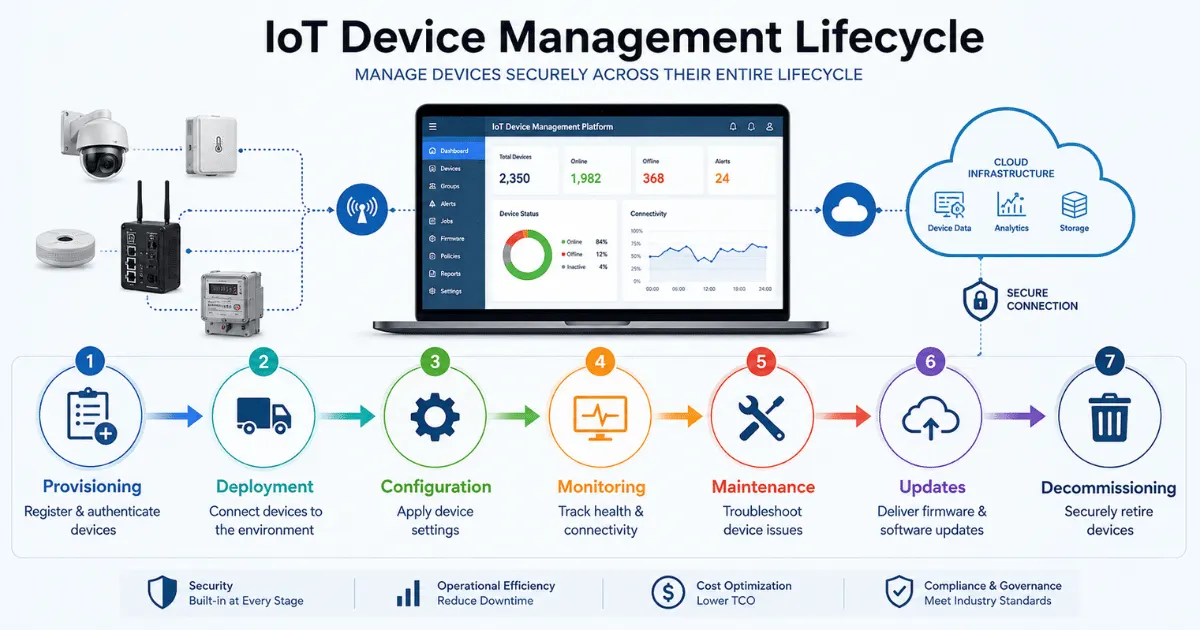
7.1 Device Planning and Provisioning
Before deployment, organizations determine which devices are required, how they will connect, and how they will be managed. During provisioning, each device can receive a unique identity, authentication credentials, and its initial configuration.
7.2 Device Deployment and Configuration
Once provisioned, devices are installed in their intended environments and configured for their specific tasks. Centralized management makes it possible to apply configuration settings consistently across multiple devices.
7.3 Device Monitoring and Maintenance
After deployment, devices need ongoing monitoring and maintenance. Administrators can track connectivity, health, performance, errors, and software versions to identify devices that require attention.
Routine maintenance may include configuration changes, troubleshooting, hardware replacement, and other corrective actions.
7.4 Software and Firmware Updates
Devices may require firmware or software updates during their operational life. Updates can improve performance, fix problems, add capabilities, or address security issues.
An IoT device management platform can help administrators distribute and track these updates across the device fleet.
7.5 Device Decommissioning
When a device reaches the end of its useful life, it should be properly removed from the active IoT environment. Decommissioning may involve disabling credentials, removing the device from management systems, securely handling stored data, and updating the device inventory.
Proper lifecycle management prevents retired or inactive devices from remaining connected unnecessarily.
Why Is IoT Device Lifecycle Management Important?
Managing the entire lifecycle gives organizations better visibility and control over their connected devices. It also helps maintain accurate inventories, reduce manual maintenance, improve security, and ensure devices are properly managed from deployment through retirement.
8. Benefits of IoT Device Management
IoT device management helps organizations operate connected devices more efficiently, especially when devices are deployed across multiple locations.
Key benefits include:
- Centralized management: Administrators can manage many IoT devices from one system.
- Reduced maintenance: Remote monitoring, configuration, and updates reduce the need for physical access.
- Better visibility: Device status, connectivity, performance, and errors can be monitored from a central platform.
- Faster troubleshooting: Problems can be identified and addressed remotely.
- Improved security: Device identities, authentication, updates, and access controls can be managed more consistently.
- Easier scalability: Centralized management makes it easier to add and manage larger numbers of connected devices.
- Lower operational costs: Automation and remote management can reduce manual maintenance and support work.
These benefits become more valuable as IoT deployments grow from a small number of connected devices to large, distributed device fleets.
9. Challenges of IoT Device Management
Managing connected devices at scale can create several operational and technical challenges.
- Large device fleets: Managing thousands of devices manually becomes difficult as deployments grow.
- Device diversity: Different hardware, operating systems, and communication technologies can make management more complex.
- Connectivity issues: Devices may experience unstable networks, weak signals, or intermittent connections.
- Security risks: Compromised devices, weak authentication, and outdated firmware can create security vulnerabilities.
- Remote updates: Firmware updates must be delivered securely and reliably, especially to devices in remote locations.
- Lifecycle management: Organizations need processes for provisioning, maintenance, replacement, and secure decommissioning.
- Scalability: A management system must continue to perform reliably as the number of connected devices increases.
A centralized IoT device management platform can reduce many of these challenges by automating routine tasks and providing a single view of the connected device fleet.
10. IoT Device Management Platforms and Software
An IoT device management platform provides the tools needed to register, configure, monitor, update, and control connected devices from a centralized system. Organizations can use these platforms to manage individual devices or large device fleets remotely.
Common capabilities include:
- Device provisioning and registration
- Device monitoring
- Remote configuration and control
- Firmware and software updates
- Device authentication
- Diagnostics and troubleshooting
- Device lifecycle management
- APIs and automation
The right platform depends on factors such as device type, deployment size, connectivity, security requirements, and the level of automation needed.
Note: We don’t need a long vendor comparison here. It would add commercial intent and unnecessary words to an article whose primary intent is informational.
Conclusion
IoT device management provides a centralized way to provision, configure, monitor, control, update, secure, and maintain connected devices throughout their lifecycle. As IoT deployments grow, centralized management becomes increasingly important for maintaining device visibility, reliability, and security.
Effective device management reduces manual maintenance, simplifies remote operations, and helps organizations keep large device fleets under control. From initial provisioning to final decommissioning, it provides the operational foundation needed to manage connected devices at scale.
FAQs
What is an example of IoT device management?
An example is a company managing thousands of connected sensors from a central platform. Administrators can view device status, identify offline devices, change settings, and manage devices remotely without visiting each location.
Can IoT devices be managed remotely?
Yes. IoT devices can often be managed remotely when they have network connectivity and support remote management functions. Authorized users can perform tasks such as changing settings, restarting devices, monitoring status, or sending commands.
How do organizations manage IoT devices at scale?
Organizations typically use a centralized IoT device management platform to maintain device inventories, automate provisioning, monitor device health, manage configurations, distribute updates, and control access across large device fleets.
What is an IoT device management platform?
An IoT device management platform is software that provides centralized tools for deploying, monitoring, configuring, updating, and controlling connected devices. It helps organizations manage individual devices or large device fleets from a single system.
What is the difference between IoT device management and IoT network management?
IoT device management focuses on the devices themselves, including their configuration, monitoring, updates, and lifecycle. IoT network management focuses more on the connectivity infrastructure that allows devices and systems to communicate.





- Be Respectful
- Stay Relevant
- Stay Positive
- True Feedback
- Encourage Discussion
- Avoid Spamming
- No Fake News
- Don't Copy-Paste
- No Personal Attacks
- Be Respectful
- Stay Relevant
- Stay Positive
- True Feedback
- Encourage Discussion
- Avoid Spamming
- No Fake News
- Don't Copy-Paste
- No Personal Attacks
