How to Write Prompts for AI Art (Step-by-Step Guide)
Published: 6 Mar 2026
Writing prompts for AI art (artificial intelligence) means giving a text-to-image model clear, structured instructions that tell it exactly what kind of image to create. The quality of the image depends directly on the quality of the prompt. A vague input produces a generic result. A specific, well-built prompt produces visuals that match a precise creative or educational goal.
The 3 main benefits of learning how to write prompts for AI art are faster content creation, more consistent visual output, and greater creative control without needing design skills. These benefits make AI art prompting especially valuable for e-learning course creators, digital marketers, and content teams that need a steady volume of original visuals.
AI art prompts are used to generate photography-style images, illustrations, paintings, digital art, and film-style stills for platforms like Midjourney, DALL-E, Stable Diffusion, Adobe Firefly, and Google Imagen. Each prompt is built from 3 core components: a subject description, an art form and style, and additional details like lighting, framing, and color scheme.
This guide covers how to write an AI art prompt from scratch, the right prompt length and language style, step-by-step instructions for each prompt component, advanced prompt engineering (PE) strategies, real AI art prompt examples, tools to automate image generation, common mistakes to avoid, and frequently asked questions.
Table of Contents
The power of prompting
AI is only as good as the instructions given to it. Writing clear, specific prompts is the difference between getting a sharp, on-point visual and getting something that misses entirely.
Whether creating visuals for an online science lesson, a corporate training course, or a digital branding campaign, learning to craft powerful AI art prompts produces a higher level of creative output in far less time. This post covers how to write prompts that help AI understand exactly what is needed and bring course content or creative projects to life in the most engaging way possible.
Key Takeaways
- The more specific and detailed a prompt is, the more accurate and effective the AI-generated art will be.
- Prompts that suit the audience’s needs produce visuals that resonate and engage more effectively.
- Vague or overloaded prompts lead to poor results. Prompts should always align with a clear visual or educational goal.
How AI art helps create engaging courses at scale
A well-placed visual makes content more memorable. With AI art generator tools, course creators and content teams can produce high-quality, engaging images that add depth to any learning experience without starting from scratch every time. There are 5 key reasons AI art matters for e-learning and content creation at scale:
- Visuals make learning more interactive, hold attention longer, and improve information retention. Boosts engagement:
- AI generates images tailored to specific audiences, from a high school science class learning the water cycle to a corporate leadership training group working on teamwork. Personalized visuals:
- AI art generator tools handle the production work so creators can focus on content structure and instructional design. Time-saving:
- AI produces large volumes of images quickly, making it practical to build extensive visual libraries without sacrificing quality. Scalable:
- AI art translates difficult concepts into clear visual formats, including infographics, diagrams, and step-by-step illustrations. Supports complex learning:
How to write an AI art prompt
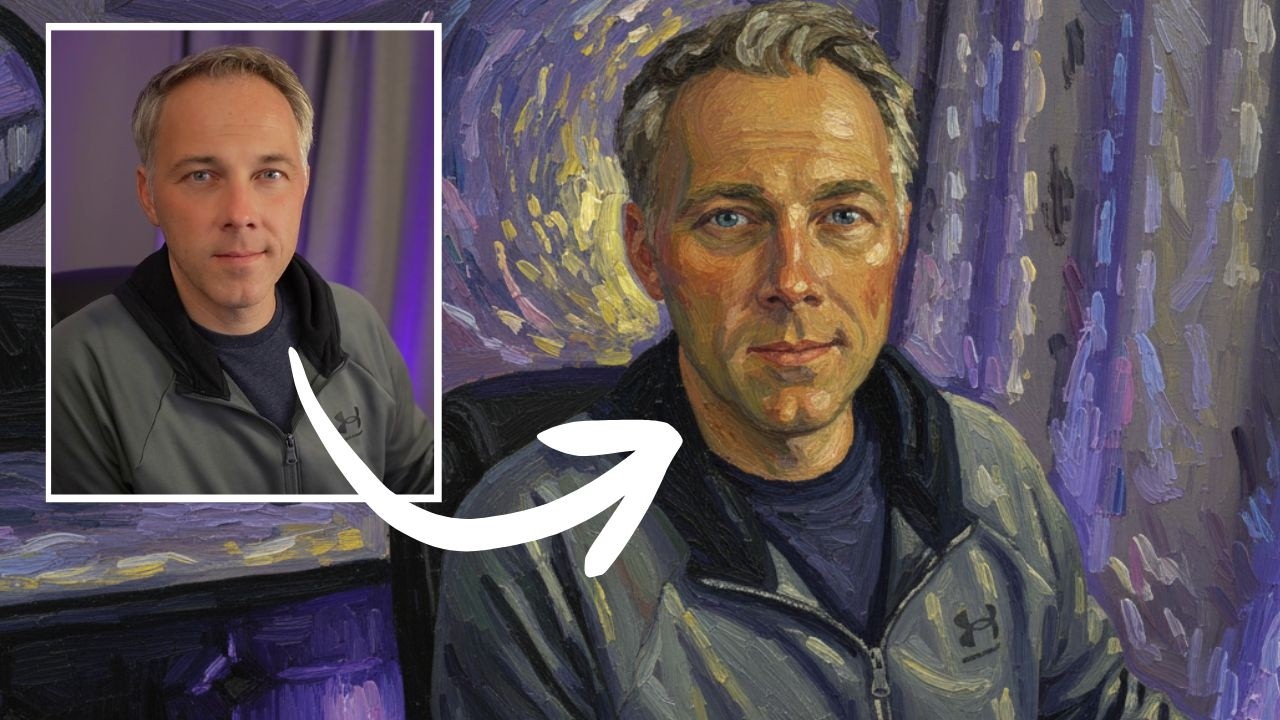
To write an AI art prompt, structure the input in 3 parts: describe the subject or content of the image, describe the art form and style, then add any other relevant details such as lighting, framing, and color scheme. This 3-part framework works across all major text-to-image AI platforms, including Midjourney, DALL-E, Stable Diffusion, Adobe Firefly, and Google Imagen.
How long should an AI art prompt be?
AI art prompt length depends on the platform being used. Midjourney works well with prompts of around 60 words. Stable Diffusion performs best when prompts stay under 380 characters. No platform sets an absolute word limit, but all of them struggle when given too many conflicting instructions at once.
A practical approach is to separate each element with a comma. This helps the AI model parse each instruction individually instead of blending them. It also makes it easier to track what has been asked for and remove elements that are not working.
What style of language should you use in an AI art prompt?
The style of language to use in an AI art prompt depends on the kind of output wanted. Use vivid, concrete language for predictable and controlled results. Use poetic or abstract wording for unexpected, experimental output.
For most practical purposes, especially in e-learning or business contexts, concrete language produces more reliable results. Saying “a diverse group of professionals in a modern conference room, corporate training style” gives the model more to work with than “people at work.”
1. Describe the subject or content of your image
Start every AI art prompt by describing the subject or content of the image. The subject is the main focus: a person, an object, a location, a concept, or an event. Examples include a cat, a family on a beach, evaporation and condensation in the water cycle, or a business meeting.
In addition to naming the subject, 3 types of detail strengthen this first section of the prompt:
- Actions the subject is performing (looking up, running, presenting, building)
- How those actions are being performed (confidently, joyfully, cautiously)
- The mood of the image (ominous, nostalgic, energetic, focused)
Here is a direct comparison:
Vague: “Create an image for a science lesson.”
Specific: “Design a detailed, colorful illustration of the water cycle for a high school science lesson, showing evaporation, condensation, and precipitation in a natural landscape with a 16:9 aspect ratio.”
The specific prompt names the subject (water cycle), the intended audience (high school science students), the style (detailed and colorful), and the aspect ratio. The vague prompt gives the model almost nothing to differentiate the output from thousands of generic science images.
2. Describe the art form and style
Once the subject is defined, describe the art form and style to achieve a specific visual effect. The art form is the medium: photography, painting, illustration, digital art, or a film still. The style is the aesthetic within that medium: realistic, impressionist, minimalist, cartoonish, cinematic.
Photography
Photography is one of the most common styles in AI art prompts, especially when the goal is a realistic-looking image. Prompts can specify camera type, lens, shutter speed, and lighting conditions to get granular control over the final output.
Example: “A child playing on a sunny beach, building a sandcastle, emulate Nikon D6 high shutter speed action shot, soft yellow lighting.”
Painting
Painting prompts unlock a wide range of visual styles. There are 3 main variables to work with: technique (oil painting, watercolor, gouache), art movement (impressionism, Fauvism, surrealism), and artist reference (Cezanne, Kahlo, Monet). Mixing all 3 in one prompt often produces the most distinctive results.
Example: “Impressionist oil painting of a cute robot.”
Illustration
Illustration prompts work well for educational content, children’s materials, and any context requiring a hand-crafted or stylized look. Common illustration types to specify include pencil drawing, charcoal sketch, cartoon, and poster.
Example: “Illustration of dinosaurs drawn by a child, cute and heartwarming.”
Digital art
Digital art as a prompt style signals a broad, contemporary aesthetic that spans concept art, UI mockups, and stylized scenes. It pairs well with mood descriptors like “lo-fi” or “nostalgic” to anchor the tone.
Example: “Isolated convenience store in the middle of the desert at sunset, car parked outside, lo-fi, nostalgic.”
Film stills
Film still prompts the model to render an image as if it were captured from an actual movie. The results tend to have strong cinematic composition, grain, and color grading.
Example: “Buildings on fire, old film still.”
And more
There are 7 additional art forms worth experimenting with beyond the common categories:
- Sculpture
- Collage
- Street art
- Textile art
- Installation art
- Ceramic art
- Lithography
3. Add any other relevant detail to your prompt
After defining the subject and art form, add extra detail to steer the final result more precisely. The 4 most impactful detail categories are framing, lighting, color scheme, and level of detail and realism.
Framing
Framing controls how the subject is positioned in the image and influences overall composition. Film and camera direction terms apply directly here: wide shot, close-up shot, point-of-view, and Dutch angle all work as prompt instructions.
One useful technique: if a close-up is not being honored by the model, move the background description after the subject description. Stating the subject first, then describing what is behind it, gives the model a clearer compositional hierarchy.
Example: “Person with strong, determined attitude, forest fire background, close-up shot, realistic.”
Lighting
Lighting changes the look and feel of an image more than almost any other single variable. There are 3 primary lighting descriptors to use: soft light, hard light, and dramatic lighting. Adding time-of-day references like “morning,” “sunset,” or “golden hour” also shapes the light quality significantly.
Example: “Lonely evil bananas on a table, hard light chiaroscuro, realistic.”
Color scheme
Color scheme prompts influence the palette of objects, light, and the overall visual tone of the image. Specifying a color scheme like “blue and white” or “purple and green” gives the model a clear constraint to work within, which produces more cohesive results.
Example: “A futuristic city, purple and green color scheme.”
Level of detail and realism
To increase the level of detail in an output, use resolution keywords like “4k” or “8k.” These do not change the actual file resolution but signal to the model to generate more intricate textures and finer lines. “Unreal Engine” as a prompt keyword produces the familiar rendered look of high-end game visuals. Adding “realistic” or “ultrarealistic” pushes photographic believability.
Example: “A distant galaxy with colorful stars, a blue Earth-like planet in the foreground, realistic, colorful, 8k, trending on artstation.”
Advanced tools and strategies for AI art prompts
Once the basic prompt structure is comfortable, there are 7 advanced tools and prompt engineering (PE) strategies to improve results further:
- Contrastive Language-Image Pre-training (CLIP) Interrogator is an AI model at Hugging Face that takes an image and outputs a text prompt based on its visual content. Use that output as a starting point to build more detailed prompts. Reverse engineer real images with CLIP Interrogator:
- Instead of starting from text alone, provide an existing image as a visual reference and refine it with text instructions. Tools like Runway support this workflow. Image-to-image generation:
- Upload an existing image to an outpainting model to expand it beyond its original frame. This is useful for adjusting composition after the fact or creating a wider scene from a smaller detail. AI outpainting:
- Platforms like Stable Diffusion allow adjustment of the number of generation steps. More steps generally produce more detail and refinement in the final image. Fine-tune generation settings:
- Tools like Leap AI let users train their own model on a specific visual style or set of reference images. This reduces output variance and makes it easier to maintain consistency across a series. Train a custom image model:
- Select parts of an existing image and change them using a text prompt. Canva and Photoshop both support this kind of targeted AI editing. Edit images with AI:
- Asking ChatGPT, Claude, or another AI chatbot to generate image prompts can surface aesthetic combinations, subject pairings, and composition ideas that are harder to arrive at manually. Use a large language model to write prompts:
AI art prompt examples
Here are 10 ready-to-use AI art prompts that illustrate the full range of the structure covered in this guide:
- “A cat on a sofa. The cat is lying on its back, looking playful.”
- “A child playing on a sunny, happy beach, their laughter as they build a simple sandcastle, emulate Nikon D6 high shutter speed action shot, soft yellow lighting.”
- “Impressionist oil painting of a cute robot.”
- “Illustration of dinosaurs drawn by a child, the illustrations are cute and heartwarming.”
- “Isolated convenience store in the middle of the desert at sunset, car parked outside, lo-fi, nostalgic.”
- “Buildings on fire, old film still.”
- “Person with strong, determined attitude, forest fire background, close-up shot, realistic.”
- “Lonely evil bananas on a table, hard light chiaroscuro, realistic.”
- “A futuristic, hopeful, busy city, with a purple and green color scheme.”
- “A distant galaxy filled with tiny colorful stars, a blue Earth-like planet in the foreground, realistic, colorful, 8k, trending on artstation.”
Where to find more AI art prompt examples
There are 3 reliable places to browse real AI art prompts alongside their generated images:
- A searchable library of Stable Diffusion prompts and outputs. Search by visual style or subject to find prompts close to a target aesthetic.Lexica.art:
- Midjourney’s Discord server is active and searchable. Use the /imagine command to generate images and browse others’ generations to study what prompt structures produce which results. Midjourney Discord channels:
- Scroll through public generations and click individual images to view the full prompt used to create them. neural. Love public library:
Joining communities on OpenAI’s Discord server and Midjourney’s server also provides access to real-time discussion, feedback, and collaboration from experienced AI art creators.
Automate your art generation
Once a reliable prompting strategy is in place, automation tools make image generation part of a repeatable, scalable workflow. Instead of writing each prompt manually, platforms like Zapier connect AI art generators with other tools to run end-to-end processes automatically.
For example, a campaign brief added to a project management tool can automatically trigger image generation, route the output to a Slack channel for review, and store the final asset in a content management system. There are 3 automation workflows worth setting up:
Generate images based on Google Form responses and save them in Google Sheets
When a user submits a Google Form, Zapier can send the form response as a prompt to OpenAI (GPT-4, DALL-E, Whisper) and save the generated image URL directly into a connected Google Sheets spreadsheet. This works well for collecting image briefs at scale from a team or client base.
Create generations in Prodia for new Typeform entries
New entries in a Typeform can trigger an automatic generation request to Prodia, a Stable Diffusion-powered API. The result is an image created from the form content without any manual prompt writing after the initial setup.
Generate images from new Discord channel messages with Eden AI
New messages posted to a specific Discord channel can be sent to Eden AI to generate an image from the message content. This is useful for community-driven image creation workflows where multiple contributors post prompts.
Tips for crafting effective AI prompts
There are 6 practical tips for writing AI art prompts that consistently produce strong results:
- AI image generators perform better with detailed, well-defined instructions. Vague prompts produce generic images. Specific prompts with subject, audience, style, and technical parameters produce targeted visuals. Get specific about what you want.
- Consider who will view the image. A prompt for a children’s science course should specify a different style and tone than one for a corporate leadership training module. State the intended audience and context directly in the prompt. Keep your audience in mind.
- Visuals communicate emotion before content. Specify whether the image should feel serious, vibrant, calm, or energetic. A prompt without a mood descriptor leaves the tone entirely up to the model. Set the right mood or tone.
- Include setting, character detail, and action. A prompt that describes “a focused young woman sitting at a desk studying digital marketing in a modern, cozy room with natural light” gives the model significantly more to work with than “a person studying.”Provide context for better results.
- To generate AI images that reflect diverse audiences, specify ethnicity, gender, age, and abilities directly in the prompt. Including identifiers like Black, Asian, and Caucasian, or noting a character using a cochlear implant, gives the model clear direction on representation. Explicitly include diversity.
- Stating the style (photography, painting, illustration, digital art) and the color scheme (blue and white, earth tones, jewel tones) gives the model a concrete aesthetic framework to follow. Be specific about the art form and style.
Common pitfalls when generating AI images
There are 3 common mistakes to avoid when writing prompts for AI image generation:
- A lack of specificity produces irrelevant or off-target images. Every prompt should define the subject, style, and at least one additional detail, like mood or lighting. Being too vague:
- Including too many details confuses the AI model. Focus on the most essential elements and leave out anything that does not directly shape the visual goal. Overloading the prompt:
- In e-learning contexts, every visual should support the course’s educational goals. A prompt that generates a visually interesting image that does not connect to the lesson topic wastes the generation and confuses learners. Not aligning with learning objectives:
Writing the best AI image prompts
AI image generation improves with every iteration. The best AI art prompts are specific, structured, and built on a clear understanding of the 3 core components: subject, style, and supporting detail.
It takes practice to get consistent results. The key is maintaining an experimentation mindset. Run the prompt, review the output, adjust one variable, and run it again. This iterative refinement process is how prompts improve over time. Each generation teaches something about how the model interprets specific language, and that knowledge compounds quickly.
For e-learning creators, that process is especially valuable. Visuals that work in a course earn their place. The time spent refining a prompt to get the right image for a science lesson or a corporate training module is time well spent, because those assets can be reused, scaled, and adapted across an entire curriculum.
Conclusion
Writing prompts for AI art start with a clear 3-part structure: describe the subject, describe the art form and style, and add supporting details like lighting, framing, and color scheme. The more specific the input, the more accurate and useful the output.
The 3 most important habits for better AI art prompt writing are specificity (name the subject, audience, and style explicitly), iteration (run, review, adjust, and repeat), and audience alignment (match the visual tone and content to the people who will see it).
AI art generation tools like Midjourney, Stable Diffusion, DALL-E, Adobe Firefly, and Google Imagen continue to improve, but the core skill of writing clear, intentional prompts remains the foundation of great output. The best AI art will always start with the best prompt.
FAQs
What is the basic structure of an AI art prompt?
An AI art prompt has 3 parts: a subject description, an art form and style, and supporting details like lighting, framing, and color scheme. Building a prompt in this order gives the model a clear hierarchy of instructions to follow.
How specific should an AI art prompt be?
A prompt should be specific enough to define the subject, style, mood, and at least one technical detail. Vague prompts produce generic results. The goal is to give the model enough context to make creative decisions that align with the intended output, not to leave those decisions entirely open.
Do negative prompts work in all AI art generators?
Negative prompts work natively in Stable Diffusion and some Stable Diffusion-based platforms. In Midjourney, the “–no” parameter serves a similar function. DALL-E and Adobe Firefly have limited native negative prompt support, though including exclusion language directly in the main prompt (“without text overlay”, “no background clutter”) achieves a similar effect.
What is the difference between prompt length on Midjourney vs. Stable Diffusion?
Midjourney works well with prompts around 60 words. Stable Diffusion performs best under 380 characters. Both platforms produce weaker results when prompts are overloaded. Keeping prompts focused and using commas to separate elements improves output quality on both platforms.
Can AI art prompts be used for e-learning visuals?
Yes. AI art prompts work well for generating e-learning visuals, including illustrated diagrams, diverse character scenes, conceptual infographics, and scenario-based images for leadership training, corporate training, and subject-specific courses. Specifying the audience, course context, and diversity requirements in the prompt produces more accurate and educationally appropriate results.





- Be Respectful
- Stay Relevant
- Stay Positive
- True Feedback
- Encourage Discussion
- Avoid Spamming
- No Fake News
- Don't Copy-Paste
- No Personal Attacks
- Be Respectful
- Stay Relevant
- Stay Positive
- True Feedback
- Encourage Discussion
- Avoid Spamming
- No Fake News
- Don't Copy-Paste
- No Personal Attacks
