How to build an AI agent with ChatGPT: A step-by-step guide
Published: 29 Jan 2026
Building an AI agent with ChatGPT involves creating a virtual assistant that leverages artificial intelligence for more than just simple programmed responses. It’s about crafting a system that can understand, learn, and act autonomously. This guide provides a step-by-step approach to building an AI agent using ChatGPT, explaining the process and available alternatives.
The main benefit of building an AI agent with ChatGPT is automation. These agents can automate tasks like customer service, task scheduling, and even personal assistance, freeing up human time and resources. They achieve this through natural language processing (NLP), which allows them to understand and respond to human language in a meaningful way.
AI agents built with ChatGPT can be applied in various scenarios. From e-commerce stores providing customer support to personal assistants managing daily tasks, the possibilities are vast. They rely on several components, including the OpenAI API, programming languages like Python, and AI agent frameworks such as LangChain.
This article will walk you through the process of defining your agent’s purpose, setting up the OpenAI API, developing its core logic, integrating external data sources, implementing user interaction channels, testing, debugging, and finally, deploying and monitoring its performance. We’ll also explore alternative methods like Operator and Jotform AI Agents for those seeking a no-code approach.
Table of Contents
What is an AI agent?
An AI agent is a software program designed to process information and make decisions independently. Unlike traditional programs that follow pre-defined rules, AI agents leverage artificial intelligence, including machine learning (ML) and deep learning, to learn from experience and adapt their behavior without constant human intervention. They embody a cognitive architecture, enabling autonomous systems capable of decision making, reasoning, and planning.
These agents can operate in diverse environments, from behind-the-scenes fraud detection systems to user-facing virtual assistants. Those that interact directly with users typically employ natural language processing (NLP) to understand and respond to text or voice input. They can perform a range of tasks, including answering questions, scheduling appointments, providing personalized recommendations, and managing workflows.
Why use ChatGPT to build an AI agent?
ChatGPT, powered by large language models (LLMs), offers several advantages for building AI agents. First and foremost is its pre-trained NLP capability. ChatGPT has been trained on vast amounts of text data, enabling it to understand and generate human-like responses. This eliminates the need to train an AI agent from scratch on basic language understanding.
Customization is another key advantage. Through the OpenAI API, developers can fine-tune ChatGPT’s responses and train the model on specific datasets to meet unique business requirements. This adaptability allows for the creation of AI agents tailored to specialized tasks.
Furthermore, using ChatGPT can be more cost-effective than building an AI agent from the ground up. The pre-trained model reduces the time and resources required for data collection and model training. Its versatility allows developers to create AI agents for various applications, ranging from simple customer service chatbots to complex personal assistants. Experts like Ethan Mollick and Andrej Karpathy have highlighted the potential of using LLMs like ChatGPT for rapid AI development.
Tools and technologies needed
Building an AI agent with ChatGPT requires a combination of tools and technologies:
- OpenAI API (ChatGPT): The OpenAI API provides access to the pre-trained ChatGPT model, allowing integration into your project. It’s the core component that powers the agent’s conversational abilities and context awareness. An API key is essential for accessing this functionality.
- Programming Languages: Python is commonly used for AI development due to its extensive libraries, but JavaScript is suitable for web-based applications. Knowledge of either language is crucial for developing and integrating your AI agent.
- AI Agent Frameworks: Frameworks like LangChain, AutoGPT, and AgentGPT offer pre-built structures for building and deploying AI agents. They simplify tasks like managing prompts and integrating external data sources. These frameworks can accelerate the AI agent development process.
- Hosting Platforms: Platforms like Amazon Web Services (AWS), Google Cloud Platform (GCP), and Microsoft Azure OpenAI Service provide reliable hosting options for AI applications. These platforms ensure your AI agent is accessible to users.
- Integration Tools: Integration tools like Zapier and Make.com enable your AI agent to connect with other software, such as databases and email platforms. These tools facilitate data exchange and enhance the agent’s functionality.
How to build an AI agent with ChatGPT in 7 steps
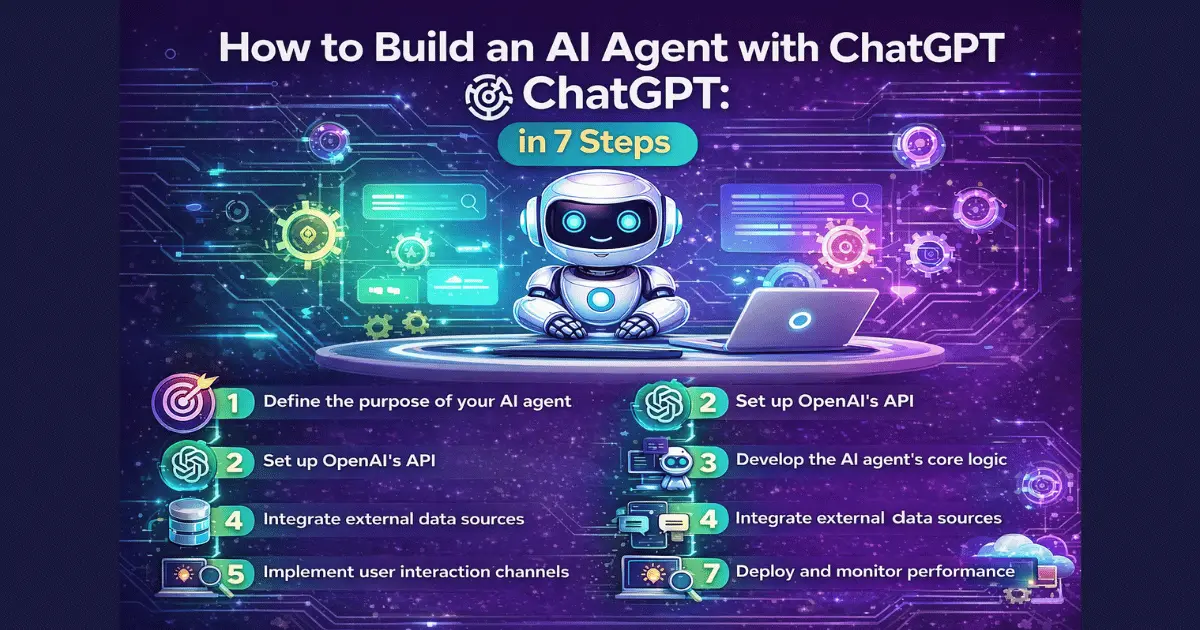
Building an AI agent with ChatGPT can be broken down into these seven steps:
Step 1: Define the purpose of your AI agent
The first step involves identifying the specific problem your AI agent will solve. What tasks will it perform? Defining the purpose clearly sets the direction for the entire development process. For example, you might want to create an AI agent to schedule appointments in a healthcare setting or to manage your daily tasks.
Step 2: Set up OpenAI’s API
Next, you need to sign up for the OpenAI API and obtain your API key. This key is essential for accessing the ChatGPT model and interacting with it programmatically. Store the API key securely, as it is required for all API requests.
After obtaining the API key, you can use Representational State Transfer (REST) APIs or Software Development Kits (SDKs) to make API requests. OpenAI provides SDKs in various programming languages like Python, Java, and Node.js.
Step 3: Develop the AI agent’s core logic
The core logic of the AI agent determines its ability to perform the intended task. This involves creating a dataset with examples of human interactions relevant to the task. A diverse dataset improves the agent’s performance.
Use Python or JavaScript to implement the decision-making processes. The agent should be able to analyze input and take appropriate actions, rather than providing generic responses. For example, a customer support chatbot should recognize whether a user is asking about pricing or account issues and respond accordingly. Prompt engineering strategies are crucial here.
Step 4: Integrate external data sources
Integrating external data sources allows the AI agent to access and use information from other systems. This could include data from customer relationship management (CRM) systems, weather APIs, news databases, or social media platforms.
Use APIs or SDKs provided by the external data sources to fetch and integrate the relevant data. This step enhances the AI agent’s ability to provide accurate and context-aware responses.
Step 5: Implement user interaction channels
The user interaction channel is the medium through which the AI agent communicates with users. This could be a chat interface, voice assistant, website, or email. The choice of channel depends on the target audience and the platform where the AI agent will be deployed.
For web interfaces, frameworks like Flask, FastAPI, or Django can be used to create web applications where users can interact with the AI agent in real time. For chat platforms like Slack, Discord, WhatsApp, or Telegram, APIs can be used to integrate the AI agent seamlessly.
Step 6: Test and debug your AI agent
Before launching the AI agent, thorough testing is crucial. Run simulations and look for errors and shortcomings. Assess the accuracy and response times, as users expect prompt and accurate answers.
Debug the code and fine-tune the algorithms to improve performance. Implement a feedback mechanism for users to report errors or provide suggestions for improvement. This iterative refinement process is essential for optimizing the AI agent.
Step 7: Deploy and monitor performance
Finally, deploy the AI agent and make it live for users. Hosting options include local servers for internal use or cloud servers for wider access.
Monitor the performance of the AI agent regularly and make improvements based on user feedback and data analysis. Key metrics to track include latency, accuracy, engagement rate, and user satisfaction. Tools like Prometheus can be used for monitoring AI agent performance.
Use Operator as an alternative
Building an AI agent using the OpenAI API can be complex and time-consuming. Operator, OpenAI’s AI agent, offers an alternative. It can perform tasks for users by going to the web itself, such as searching for web pages, ordering things online, making bookings, and filling out forms.
Operator runs on the computer-using agent model, which combines GPT-4o’s vision capabilities with reinforcement learning for advanced reasoning. It can “see” web pages and interact with them like a human.
Another alternative method: Jotform AI Agents
Jotform AI Agents provide another alternative. They can automate various functions, including web-based and document-based ones, across a wide range of industries.
Jotform AI Agents can train on any data, such as your organization’s knowledge base or existing documents. They transform your forms into smart forms that can make decisions on their own based on your specific criteria and hold interactive conversations with your users. Use cases include feedback collection, appointment booking, and IT service request simplification.
You can create an AI agent from scratch or use an existing template from the Jotform AI agent directory. No code is required.
Get started for free with Jotform AI Agents
Starting from scratch to build an AI agent requires time and expertise, including API use and familiarity with programming languages.
Jotform AI Agents offer a more straightforward and time-efficient approach. With over 7,000 AI Agent Templates available, you’re likely to find one that suits your needs. You can try it for free.
Conclusion
Building an AI agent with ChatGPT offers a powerful way to automate tasks and enhance user experiences. By following the step-by-step guide, you can define your agent’s purpose, leverage the OpenAI API, develop its core logic, integrate external data sources, implement user interaction channels, and ensure its performance through testing and monitoring. While the process requires technical expertise, alternative methods like OpenAI’s Operator and Jotform AI Agents provide no-code solutions for those seeking a simpler approach. Whether you choose to build a custom agent or leverage pre-built templates, the possibilities for AI-powered automation are vast, enabling you to create intelligent agents that can transform workflows and improve efficiency.
FAQs
How to build an AI agent with ChatGPT-5?
Define the agent’s goal, connect ChatGPT-5 via the OpenAI API, build core logic, add data sources, test thoroughly, and deploy with ongoing monitoring.
AI agents typically include task planning, memory, and tool integration.
Best results come from clear prompts, structured workflows, and continuous evaluation.
How to build an AI agent with ChatGPT using Python?
Use Python to define the agent’s goal, connect to ChatGPT via the OpenAI API, implement core logic and decision-making, integrate tools or data sources, test, and deploy with monitoring.






- Be Respectful
- Stay Relevant
- Stay Positive
- True Feedback
- Encourage Discussion
- Avoid Spamming
- No Fake News
- Don't Copy-Paste
- No Personal Attacks
- Be Respectful
- Stay Relevant
- Stay Positive
- True Feedback
- Encourage Discussion
- Avoid Spamming
- No Fake News
- Don't Copy-Paste
- No Personal Attacks
